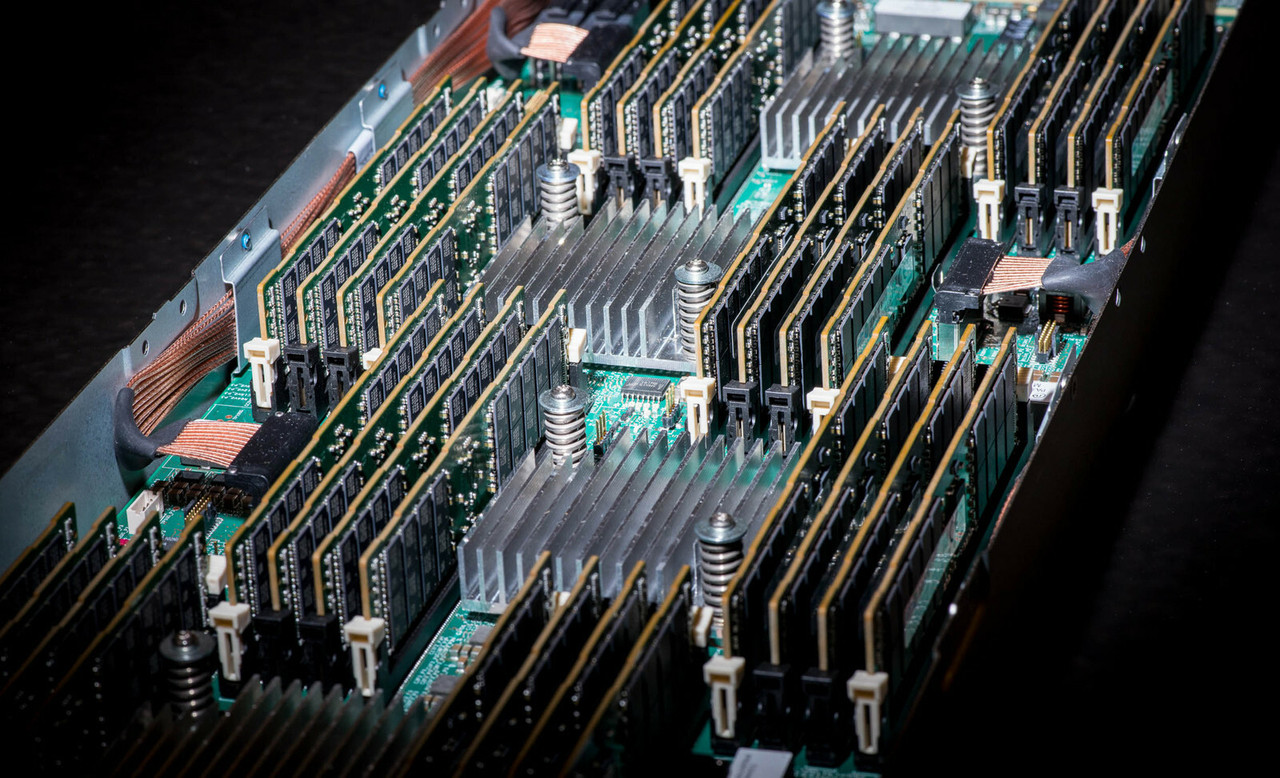
HPE ProLiant DL980 G7 Memory
Genuine HPE DDR3 Registered memory for the HPE ProLiant DL980 G7, new and refurbished. Memory on this platform does not sit on the system board: it goes into 16 memory cartridges, eight DIMMs each, and because the server always runs in Hemisphere mode the two cartridges on a processor must carry matching configurations or the extra memory in the larger one is simply ignored.
DL980 G7 Memory Specifications
- Type: DDR3 Registered (RDIMM) only, PC3-10600 (DDR3-1333) and PC3-8500 (DDR3-1066), including PC3L low-voltage kits documented for the Intel Xeon E7 family — UDIMMs are not supported at all
- Slots: 128 DIMMs — eight memory cartridge slots in each of the two processor and memory drawers, each cartridge taking up to eight DIMMs
- Maximum: 4TB, reached with 128 modules of 32GB
- Minimum: 16 DIMMs, two on each of the two cartridges attached to processors one through four
- Installation unit: quads of four identical DIMMs, by letter in sequence — 1A and 8A, then 3B and 6B, then 2C and 7C, then 4D and 5D
- Speed: set by the processor, not the module — a 6.4GT/s QPI processor runs memory at 1066MHz and a 4.8GT/s processor at 800MHz
Hemisphere mode is always on, and it is unforgiving. The two memory cartridges attached to each processor must carry matching configurations; if they do not, the DL980 G7 ignores the extra memory in the larger of the pair. Buy in quads of identical DIMMs and keep the pair on every processor balanced.
How many DIMMs should go in each cartridge?
| DIMMs per cartridge | System total | What HPE documents |
|---|---|---|
| 2 | 16 across eight cartridges | The minimum allowable configuration, on the cartridges for processors one to four |
| 4 | 64 across sixteen cartridges | Every DDR3 channel populated — the documented minimum for performance |
| 8 | 128 across sixteen cartridges | Maximum bandwidth, and the only route to 4TB |
Two rules decide whether a large configuration actually reaches the operating system. Hemisphere mode requires the pair of cartridges on each processor to match, and an unbalanced pair wastes the difference. Above that, 64 16GB DIMMs in 40-bit address mode must be spread evenly across all 16 cartridges or some of the 1TB goes unrecognised, and anything larger than 1TB requires 44-bit addressing.
Choosing the Right DL980 G7 Memory
- Buy in quads, and preferably in one part number. Each quad is four DIMMs of identical characteristics, and HPE recommends identical part numbers throughout the server.
- Check the processor family before ordering large modules. The DL980 16GB and 32GB low-voltage kits, and the DL980 low-voltage 4GB and 8GB kits, are documented for the Intel Xeon E7 family only. A Xeon 7500 series machine takes the standard-voltage PC3-10600 Registered parts.
- A faster DIMM will not raise the clock. Frequency follows the processor's QPI speed, so 1333MHz-rated modules still run at 1066MHz here, and at 800MHz behind a 4.8GT/s processor.
- Quad rank beats dual rank, and equal sizes beat mixed. HPE documents higher performance from more ranks per DIMM, and best performance when every installed DIMM is the same size.
- The cartridge is a part in its own right. Eight memory boards come standard and 16 are supported, but reaching 16 means the DL980 CPU assembly and a second set of populated processors.
Complete Your DL980 G7 Build
Memory clock and memory ceiling are both set by the processors, so read the DL980 G7 processors page alongside this one. For the rest of the server, browse DL980 G7 hard drives, storage controllers, networking adapters and power supplies, or start from the full DL980 G7 parts listing. Background reading: understanding memory rank in HPE servers and the importance of memory speed, and every model is listed under HPE parts by server model.
DL980 G7 Memory FAQ
What is the maximum memory in a DL980 G7?
4TB, using 128 32GB modules across 16 fully populated memory cartridges. Reaching it needs all eight processors fitted, because each drawer holds eight cartridges.
Why is some of my DL980 G7 memory not being used?
The server always runs in Hemisphere mode, which requires the two memory cartridges attached to a processor to have matching configurations. If they are unequal, the DL980 G7 ignores the extra memory in the larger of the two.
Can I use unbuffered memory in a DL980 G7?
No. UDIMMs are not supported on this platform. Only Registered DIMMs at 1066 or 1333 speeds, running at 1066, are supported.
Why does my DL980 G7 memory run at 1066MHz instead of 1333MHz?
Memory speed here is a function of the processor's QPI bus speed. Processors at 6.4GT/s run memory at 1066MHz and processors at 4.8GT/s run it at 800MHz, regardless of how the DIMMs are rated.
How many DIMMs do I have to install at once?
Four. DIMMs go in as quads of four modules with identical characteristics, populated by letter in sequence: 1A and 8A first, then 3B and 6B, then 2C and 7C, and 4D and 5D last.
Do I need extra memory cartridges?
Only if you are going past eight. Eight memory boards come standard on pre-configured and CTO models, and the maximum of 16 also requires the HPE DL980 CPU assembly.
✅ Looking for a specific DL980 G7 memory module? Browse our full selection below.
Browse all models

Why Global One?
- Trusted by thousands. Over 36,000 customers in 100+ countries trust Global One Technology to deliver mission-critical HP Enterprise hardware - including Fortune 500 businesses, schools, hospitals, and federal, state, and local goverment agencies.
- HPE is our specialty! We only sell genuine HP Enterprise parts.
- EASY ordering process. Purchase online now with credit card or PayPal!
- FAST shipping. Global One Technology ships orders received by 4pm ET the same day and offers NEXT DAY delivery to US customers.



